



 Browse
Course
Browse
Course

3000+ Students enrolled in the course

500+ Reviews
Professional CCNA & MTCNA
Delivery Mode

Theory

Lab Based

Online Live Class

Recorded Video
The Cisco CCNA (Cisco Certified Network Associate) and MikroTik MTCNA (MikroTik Certified Network Associate) are very popular certifications in today’s IT and networking job market. CCNA teaches you how to set up, configure, and fix medium-sized networks, connect remote sites through WAN, handle basic security issues, and understand wireless networks. MTCNA focuses on working with MikroTik devices, including IP setup, routing, firewalls, VPNs, and wireless connections, which is useful for internet service providers and businesses. With more companies using complex networks, cloud systems, and automation, skilled network professionals are in high demand. These certifications help you get ready for real-world networking jobs, improve your skills, and stay competitive in the growing IT field.
4 Months
Course Duration
2
Industrial Project
34
Classes
14
Bonus Track
Exclusive Solutions That Set Us Apart :

Online Live Batch
Review Class
Practice Lab Support
Class Videos
Key Highlights :
-
•
Cisco Router, Switch, and Network Device Configuration
-
•
IP Addressing, Subnetting, and VLAN Configuration
-
•
Dynamic Routing Protocols (RIP, EIGRP, OSPF)
-
•
MikroTik Router Configuration, DHCP, VPN, and Firewall Setup
-
•
Automation using GNS3 and Real Device Simulation
-
•
Marketplace and Project-based Learning
Job Opportunities:

Network Engineer
Network Administrator
Systems & Network Analyst
Wireless Network Engineer
Network Consultant
Data Center Network Engineer
Network Automation Engineer
ISP Network Technician
Telecom Network Engineer
Network Support Engineer
Network Trainer / Instructor
Freelance / Remote Network Engineer
Class Structure & Distribution of Total 47 Classes:
(For Offline Course)
Offline Class - Onsite in Campus: 33 Class

On Campus (Theory)
7 Classes - Per Class 2 Hrs

On Campus (Lab)
26 Classes - Per Class 2 Hrs
Extra Online & Recorded Class: 14 Class

Online Extra Live Class
4 Classes - Per Class 1+ Hrs

Required Recorded Videos
10 Classes - Duration Variable
Required Before Participating:

Basic Knowledge of Using Computer

Desktop / Laptop

Internet Connection
This Course is Designed for
(Everyone)

Job seekers

Students

Homemakers
Softwares You'll Learn:
(AI Driven)

Cisco Devices

GNS3

MikroTik Device

Packet Tracer

MikroTik RouterOS
Course Outline Structure

Provide required PDF + Class Recordings to ensure the best learning for our students.

2 Modules

39 Classes

0 Project

36 Topics

31 Resources

Duration: 24 Classes

Focus:
Cisco Router, Switch, and Network Device Configuration
IP Addressing, Subnetting, and VLAN Configuration
Dynamic Routing Protocols (RIP, EIGRP, OSPF)

Class Type Breakdown:
- Recorded Video: 6 Classes
- Lab (Practical): 13 Classes
- Online Theory: 3 Classes
- Lab (Exam): 2 Classes
Career Path: Network Administrator | Network Engineer | System Support Engineer | ISP Engineer | Routing & Switching Specialist
Prerequisites: Computer Basics
Key Highlights:
- • Cisco Router, Switch, and Network Device Configuration
- • IP Addressing, Subnetting, and VLAN Configuration
- • Dynamic Routing Protocols (RIP, EIGRP, OSPF)
Projects:
- • Design a corporate network
| Class No. | Class Type | Topic/Lesson | Resource Type |
|---|---|---|---|
| Class 1 | Recorded Video | Packet Tracer installation & Packet Tracer Overview |
 Recorded Video
|
| Class 2 | Lab (Practical) | Routing Day 1: Static Routing |
Class Video
|
| Class 3 | Lab (Practical) | Routing Day 2: Dynamic Routing- RIPv2 |
Class Video
|
| Class 4 | Online Theory | Online Practices |
N/A
|
| Class 5 | Lab (Practical) | Routing Day 3: Dynamic Routing- OSPF Single Area |
Class Video
|
| Class 6 | Recorded Video | Difference between Dynamic Routing Protocols |
Recorded Video
|
| Class 7 | Lab (Practical) | Routing Day 4: Dynamic Routing- OSPF Multi Area |
Class Video
|
| Class 8 | Recorded Video | Routing Day 5: Dynamic Routing- EIGRP |
Recorded Video
|
| Class 9 | Lab (Exam) | Skill Test 1 |
N/A
|
| Class 10 | Lab (Practical) | VLAN Configuration |
Class Video
|
| Class 11 | Lab (Practical) | Inter - VLAN Configuration |
Class Video
|
| Class 12 | Recorded Video | NTP |
Recorded Video
|
| Class 13 | Lab (Practical) | Etherchannel |
Class Video
|
| Class 14 | Recorded Video | STP (Spanning Tree Protocol) |
Recorded Video
|
| Class 15 | Online Theory | Online Practices |
N/A
|
| Class 16 | Lab (Practical) | Trunking Protocol |
Class Video
|
| Class 17 | Lab (Practical) | Router Password Configuration |
Class Video
|
| Class 18 | Lab (Practical) | Port Security & Telnet, SSH |
Class Video
|
| Class 19 | Lab (Practical) | ACL (Access Control List) |
Class Video
|
| Class 20 | Lab (Practical) | NAT & PAT Configuration |
Class Video
|
| Class 21 | Recorded Video | PPPOE |
Recorded Video
|
| Class 22 | Lab (Practical) | VPN |
Class Video
|
| Class 23 | Online Theory | Online Practices |
N/A
|
| Class 24 | Lab (Exam) | Skill Test 2 |
N/A
|
Duration: 15 Classes
Focus:
MikroTik Router Configuration, DHCP, VPN, and Firewall Setup
Automation using GNS3 and Real Device Simulation
Marketplace and Project-based Learning
Class Type Breakdown:
- Offline (Theory): 1 Class
- Recorded Video: 3 Classes
- Lab (Practical): 8 Classes
- Lab (Exam): 2 Classes
- Online Theory: 1 Class
Career Path: Network Administrator | Network Engineer | System Support Engineer | ISP Engineer | Routing & Switching Specialist
Prerequisites: CCNA, Computer Basics
Key Highlights:
- • MikroTik Router Configuration, DHCP, VPN, and Firewall Setup
- • Automation using GNS3 and Real Device Simulation
- • Marketplace and Project-based Learning
Projects:
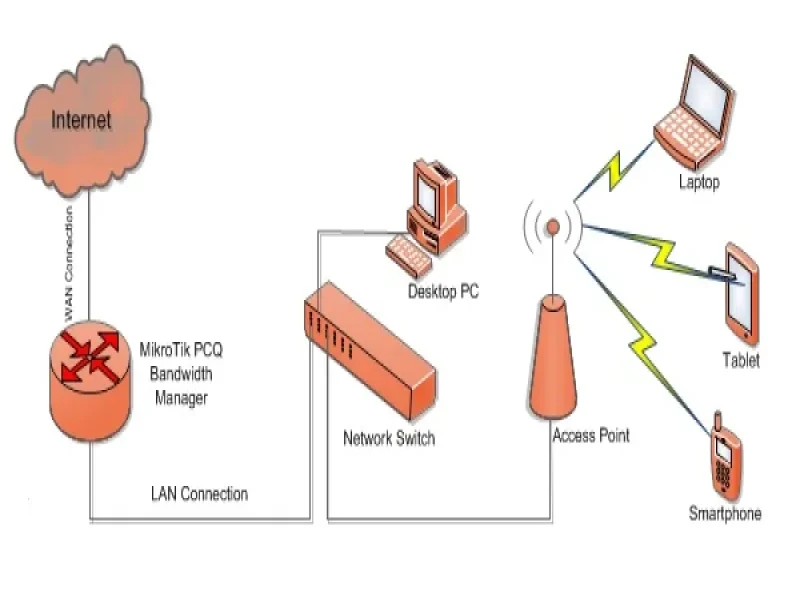
- • Bandwidth Manage
| Class No. | Class Type | Topic/Lesson | Resource Type |
|---|---|---|---|
| Class 1 | Offline (Theory) | Introduction to MTCNA and Vendor |
PDF
|
| Class 2 | Recorded Video | LAB setup with MikroTik ISO, MikroTik OS License levels, Hyper-visor & GNS3 installation |
Recorded Video
|
| Class 3 | Lab (Practical) | MikroTik Router basic Configuration on Hardware Device |
Class Video
|
| Class 4 | Lab (Practical) | DHCP, ARP and MAC Binding |
Class Video
|
| Class 5 | Lab (Practical) | Bridging overview & Wireless Network |
Class Video
|
| Class 6 | Lab (Exam) | Skill Test 3 |
N/A
|
| Class 7 | Lab (Practical) | Routing overview, Route Flags & Static routing |
Class Video
|
| Class 8 | Recorded Video | 802.11a/b/g/n/ac Concepts |
Recorded Video
|
| Class 9 | Lab (Practical) | Setup a simple wireless link |
Class Video
|
| Class 10 | Lab (Practical) | Firewall principles, Filter Rules & NAT Rules |
Class Video
|
| Class 11 | Lab (Practical) | Simple Queue Configuration, Burst configuration & PCQ |
Class Video
|
| Class 12 | Lab (Practical) | PPPOE, Tunnels, Point-to-point addresses, Ip pool |
Class Video
|
| Class 13 | Recorded Video | RouterOS & Monitoring Tools |
Recorded Video
|
| Class 14 | Online Theory | Online Practices |
N/A
|
| Class 15 | Lab (Exam) | Skill Test 4 |
N/A
|
Admission Is Going On
Enroll now to any of our Offline Courses (On- Campus)

Course Fee Offline
BDT. 30,000
Online (Live Class) courses as per your suitable time.
Course Fee Online
BDT. 15,000
Some of the Creative Projects Done by Our Students
Students Shared Their Feedback


Tazim
5.0
Creative IT Institute is one of the best IT training institute that i know of. They're well behaved & professional 👍 Environment was calm although i noticed some disturbance while i was in there, some of the students as they were leaving, they were shouting & laughing carelessly., it shouldn't have happened 🙂 but everything else is fine & right by me 👍

Mahmudul Hasan Wali
5.0
Creative IT Institute is No 1 IT institute in Bangladesh. If you want to develop your skills then you can visit Creative IT Institute

Nurul Amin (Shah)
5.0
One of best training institution in Dhaka, Bangladesh
Course Related FAQ
Answer : You can work as a network engineer, network administrator, network security specialist, ISP technician, or system analyst. With experience, you can also move into cloud networking, network automation, or cybersecurity roles.
Answer : Yes, networking is in demand. Companies, banks, telecoms, and ISPs need skilled professionals. It offers stable jobs, career growth, and opportunities to work internationally or remotely.
Answer : Local banks, telecom companies like Grameenphone, Robi, Banglalink, IT firms, government agencies, and ISPs often hire network engineers and administrators.
Answer : Entry-level network jobs usually start around 20,000–35,000 BDT/month. Experienced professionals can earn 60,000–150,000 BDT/month depending on skills and certifications.
Answer : Yes, with skills like CCNA, MTCNA, or cloud networking, you can work for international companies or freelance remotely. Networking is in demand worldwide.
Answer : Start with CCNA for Cisco networking basics. If you want to work with MikroTik devices, take MTCNA. Both are useful; you can do both later.
Answer : No, a degree is not required. Basic computer knowledge and interest in networking are enough to start learning and earning certifications.
Answer : Online courses help a lot, but practicing in labs with Packet Tracer, GNS3, or real devices is important to gain real skills.
Answer : CCNA is widely recognized in banks, IT companies, and telecoms. MTCNA is valued for MikroTik-based ISPs and small networks.
Answer : You should know Windows and Linux basics, IP addressing, using a web browser, file management, and basic command-line operations.
Answer : Start with one based on your goal. Cisco is good for corporate jobs; MikroTik is popular with ISPs. Learning both increases job opportunities.
Answer : Basic scripting (Python) is useful for automation, but most networking tasks do not require deep programming skills.
Answer : Yes, hands-on practice with real devices or simulators is very important to understand configuration and troubleshooting.
Answer : Yes, many training centers in Dhaka, Chittagong, and other cities provide practical labs for CCNA, MTCNA, and networking courses.
Answer : Yes, networking knowledge is important for cybersecurity. Understanding networks helps protect them, configure firewalls, VPNs, and detect attacks.
Answer : A laptop or desktop with the following minimum specifications is recommended: Processor: Intel Core i3 (12th Generation or higher), Memory (RAM): 8 GB or more, Storage: 256 GB SSD or higher.
Course Services and Support
Job Placement Support
Creative IT offers students an exclusive gateway to their dream careers through its Job Placement Support. Throughout the course, learners receive targeted training in CV crafting, portfolio development, and essential soft skills, ensuring they are industry-ready. Upon completion, students are strategically referred to companies that match their skills and potential.
Backup Class
A Backup Class is a special facility where students can revisit lessons missed due to illness or emergencies. It helps maintain learning continuity and ensures that students’ progress is not interrupted. However, the number of backup classes may vary depending on the course. Therefore, it is advisable not to miss classes unless absolutely necessary.