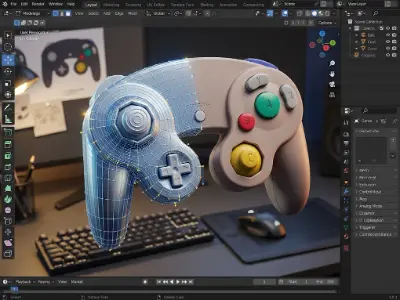
GameCube Controller Modeling
Create a detailed 3D GameCube controller using advanced polygonal modeling, bevel, subdivision, and surface detailing techniques in Blender.

The demand for skilled 3D artists is growing across film, gaming, advertising and digital media, where studios seek professionals who can create realistic models, animated characters and immersive visual experiences. This Advanced 3D Animation course helps students develop industry-relevant skills in 3D modeling, character animation, texturing, lighting and rendering through practical learning, preparing them to build a strong portfolio and pursue professional careers or freelance opportunities in the creative industry.


Mastering 3D Polygonal Modeling, Product Visualization, and Fluid/Smoke Simulation using Blender to create high-quality animated and still product renders.
| CLASS | TOPIC | TYPE |
|---|---|---|
| Class 1 | Introduction Of Blender, Opportunities, Screen Preview / Interface, Move/Rotate/Scale Tools, 2D/3D View port, Orthographic View, Camera Focus | Lab |
| Class 2 | Understanding custom Project Window, Polygonal Modeling, Components of a Polygon, Poly Count / Statistics, Get Back The Operator Box (F9), Duplicate, Axix and Gizmos, Shade Smooth or Flat | Lab |
| Class 3 | Subdivision, Knife, Loop Cut Tool | Theory |
| Class 4 | Extrude, Bevel, Combined, Extract Faces / Split | Lab |
| Class 5 | Marge Vertex, Taget Weld Tool, Auto Marge, Vertex Snap On, Bridge, Detach, Chamfer | Theory |
| Class 6 | Proportional Editing, Modifiers, Boolean, Solidify, Arrey, Subdivition Surface | Theory |
| Class 7 | Nonlinear, Latice, Work with Symmetry, Mirror Tool, Smooth/Subdivision surface, Reduce/Decimate, Shader editor, Texture connecting | Lab |
| Class 8 | Product 01: Switch GameCube Controller project | Theory |
| Class 9 | Product 02: Go pro camera project | Theory |
| Class 10 | Animation Basics, Graph editor, Camera Animation, Motion trail animation, Translate, Rotate, Scale Animation | Lab |
| Class 11 | Problem solving class | Online |
| Class 12 | Natural environment making, Vegetation plugin, Scattering with Geo node, Natural product visualization | Lab |
| Class 13 | Product modeling | Recorded |
| Class 14 | Indoor product visualization, Coffee machine animation | Lab |
| Class 15 | Product Lighiting, Light animation, Explode animation | Theory |
| Class 16 | Problem solving | Online |
| Class 17 | Introduction to Simulation, Fluid Simulation (Domain, Flow, Collider), Smoke Simulation, Water Simulation | Theory |
| Class 18 | Effector, Splash Simulator, Crown Splash simulator | Lab |
| Class 19 | Simulation | Recorded |
| Class 20 | Path along liquid simulator, Fluid simulation in Product visualization, Simulation Export Methods | Lab |
| Class 21 | Exam Mcq | Lab |
Product Visualization Artist · 3D Generalist · 3D Motion Designer
Mastering the 12 Principles of Animation by applying them to foundational exercises (Bouncing Ball, Walk/Run Cycles) using the Graph Editor and core animation tools in Autodesk Maya.
| CLASS | TOPIC | TYPE |
|---|---|---|
| Class 1 | 12 Principals of Animation: Squash & Stretch, Anticipation, Staging, Straight Ahead & Pose to Pose, Follow Through & Overlapping Action (Dragging), Slow Out & Slow In Spacing, Arc, Secondary Action, Timing, Exaggeration, Solid Drawing, Appeal | Lab |
| Class 2 | Animation Explain | Online |
| Class 3 | Animation Tools in MAYA, Animation Interface in MAYA, Graph Editor Introduction, 1st to 4th Principle of Animation, Timing, Slow Out & Slow In (Spacing), Arc, Squash & Stretch, Ball Animation, Bouncing Ball, Graph Editor (Auto, Spline, Linear, Break Tange | Lab |
| Class 4 | Constrain Animation | Recorded |
| Class 5 | Walk Cycle | Lab |
| Class 6 | Run Cycle | Lab |
| Class 7 | Image sequence | Online |
| Class 8 | Action animation | Lab |
| Class 9 | Time Editor And animation Export | Lab |
Entry-level 3D Character Animator
Using Unreal Engine 5 as a real-time platform to create high-quality cinematic videos, focusing on environment design, realistic lighting, and integrating external animated assets via the Sequencer tool.
| CLASS | TOPIC | TYPE |
|---|---|---|
| Class 1 | Introduction & Project Setup: Getting Started with Unreal Engine 5, UE overview & UI introduction, Understanding real-time rendering workflow, Creating a new Film/Cinematic project, Project folder setup & asset organization | Lab |
| Class 2 | Importing Assets from Maya: Exporting FBX (Character + Animation) from Maya | Lab |
| Class 3 | Import settings for skeletal mesh & animation, Setting up materials & textures, Testing animation playback in Unreal | Online |
| Class 4 | Environment Design Basics: Building the Scene Environment, Using Starter Content / Quixel Megascans, Placing props, ground, background assets, Landscape creation & sculpting tools basics, Level composition & environment layout | Lab |
| Class 5 | Lighting & Atmosphere: Realistic Lighting Setup, Directional Light, Sky Light, HDRI, Post Process Volume setup | Theory |
| Class 6 | Volumetric Fog, Sky Atmosphere, Time of day (sun angle, mood lighting) | Online |
| Class 7 | Material & Texture Integration: Material Editor & Texturing, Importing texture maps from Substance Painter, Creating material instances, Surface properties tweaking, Decal and emissive materials | Theory |
| Class 8 | Camera Setup & Sequencer Basics: Cinematic Camera Control, Adding CineCameraActor, Camera movement and keyframes, Depth of field, focus distance, focal length, Sequencer timeline introduction | Theory |
| Class 9 | Animation & Sequencer Editing: Character Animation & Scene Timing | Theory |
| Class 10 | Adding animated character to Sequencer, Managing animation playback & loopin | Online |
| Class 11 | Rendering & Movie Render Queue: High-Quality Rendering Techniques, Movie Render Queue setup, Lighting adjustments for final render, Color grading basics, Render pass export | Theory |
| Class 12 | Sound & VFX Integration: Enhancing with Sound & Effects, Adding background sound & music, Using Niagara particle system (dust, fire, fog, rain), Matching sound timing with animation, Final environment polish | Theory |
| Class 13 | Final Output & Presentation: Final Cinematic Assembly | Theory |
| Class 14 | Export, Final Sequencer editing, Exporting full cinematic video, Reviewing render output | Online |
| Class 15 | Compositing | Lab |
Virtual Production Specialist · Lighting Artist
Verify your mobile number to see every module.
Enter the 6-digit OTP sent to
Share your details and our team will reserve your seat in an upcoming free class of Advanced 3D Animation.
Every project is portfolio-grade and presented with mockups, the way a client would receive it.
Create a detailed 3D GameCube controller using advanced polygonal modeling, bevel, subdivision, and surface detailing techniques in Blender.
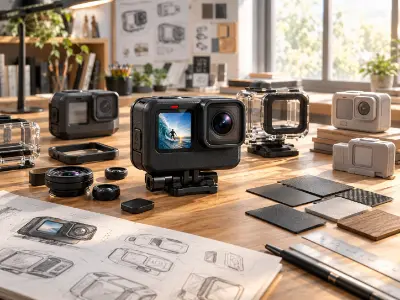
Model and visualize a GoPro camera with realistic materials, lighting, texturing, and professional product rendering techniques.

Create an engaging 3D product animation using transform animation, camera movement, timing, and cinematic presentation techniques.

Build a realistic natural environment using Geo Nodes, vegetation, scattering, and environment creation techniques in Blender.
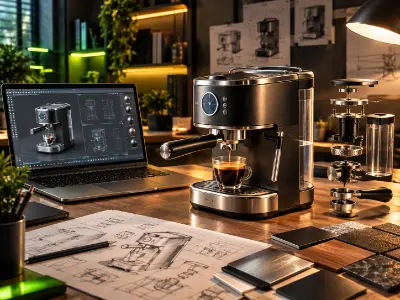
Create an indoor coffee machine product visualization with realistic lighting, camera animation, and cinematic product presentation.
Create realistic water effects using Blender's Fluid Simulation tools, including water flow, splashes, and crown splash effects.
Create dynamic and realistic smoke effects using Blender's smoke simulation techniques for animated visual effects.
Develop a professional 3D product mockup combining modeling, texturing, lighting, and realistic rendering techniques.
Create a realistic bouncing ball animation in Maya using timing, spacing, squash and stretch, and Graph Editor techniques.
Create a complete character walk cycle in Maya with proper weight, timing, spacing, and body movement.
Create a dynamic character run cycle focusing on movement, timing, weight, and realistic animation principles.
Create an engaging character action animation using animation principles, timing, arcs, and secondary actions in Maya.
Build a detailed cinematic environment in Unreal Engine 5 using landscape tools, Quixel Megascans, props, and environment assets.
Create realistic cinematic lighting using HDRI, Sky Light, Directional Light, Volumetric Fog, and Post Process settings.
Import animated character assets from Maya into Unreal Engine using FBX and set up materials, textures, and animation playback.
Create cinematic camera movements using CineCameraActor and Sequencer, including keyframes, depth of field, and focus control.
Combine environment, character animation, lighting, camera movement, sound, and VFX to produce a complete cinematic video.
Produce a professional-quality cinematic render using Movie Render Queue, lighting adjustments, color grading, and optimized render settings.
more practical projects across the course modules.
Free consultation & path planning
Enrol, orientation & kick-off
4 month, 51 classes begin
Theory, lab & AI workflows
27 client-grade builds
Viva, exam & course certificate
CV, interview & portfolio polish
Placement referral or freelance
Build a professional career in 3D animation, character development, rigging, simulation, and visualization using Autodesk Maya and Unreal Engine through advanced practical training and industry-focused projects.
"Lab support and mentor feedback were excellent. The portfolio I built here helped me get my first paid work."
"The Computer Networking with CCNA course was practical from day one. The mentors explained everything clearly and the projects helped me build real confidence."
"Lab support and mentor feedback were excellent. The portfolio I built here helped me get my first paid work."
"The Video Editing with Premiere Pro course was practical from day one. The mentors explained everything clearly and the projects helped me build real confidence."
"Lab support and mentor feedback were excellent. The portfolio I built here helped me get my first paid work."
"The 3D Modeling & Rendering with Blender course was practical from day one. The mentors explained everything clearly and the projects helped me build real confidence."
"Lab support and mentor feedback were excellent. The portfolio I built here helped me get my first paid work."
"The Digital Marketing Professional course was practical from day one. The mentors explained everything clearly and the projects helped me build real confidence."
To enroll at Creative IT Institute, choose your preferred course and enroll online or in person at your nearest campus. If needed, our counsellors can help you pick the course that suits you best.
Our counsellors will help you choose the right course based on your interests and career goals.
Our courses run online, offline and in a hybrid format that combines both, so students can learn in the way that suits them.
Yes, you get direct support and guidance from experienced mentors throughout the course.
Yes. Creative IT Institute is ISO 9001 certified and issues a course certificate after you complete your assessments and projects.
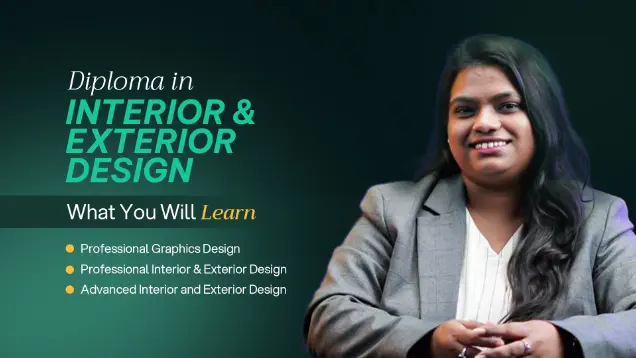
Master Interior and Exterior design through practical projects and industry-focused training.
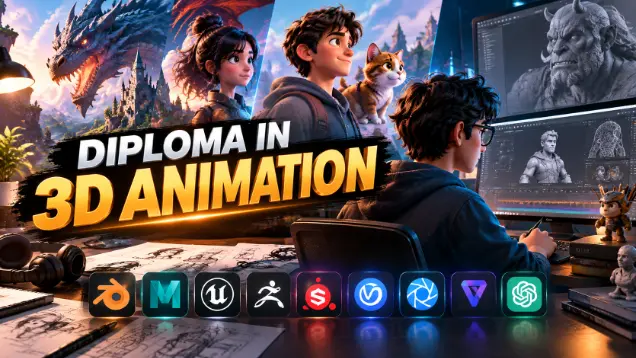
Master 3D modeling, animation and visual storytelling through practical industry-focused training.
Master professional interior & exterior visualization
Share your details and our team will reserve your seat in an upcoming free class of Advanced 3D Animation.
Fill in the form to reserve your seat in a free class.
Fill in the form to book your seat.
Fill in the form and an advisor will call you within one working day.
Fill in the form and an advisor will call you within one working day with the best discount available for this course.